
EndeavorOTC®: Outplay ADHD
Akili Interactive Labs, Inc.Medical
3.5255.00 Reviews
- Version
- 4.0.1
- Installs
- 50.00K
- Age Rating
- Everyone
Screenshots
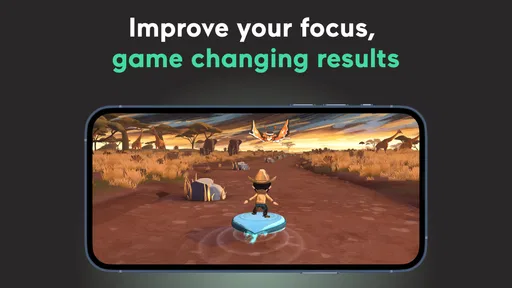

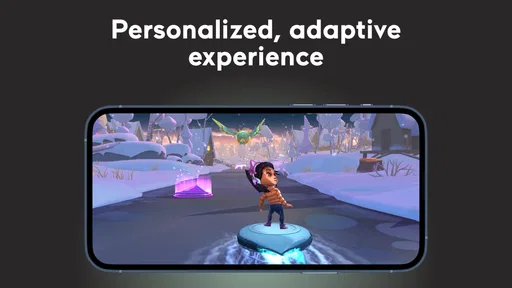
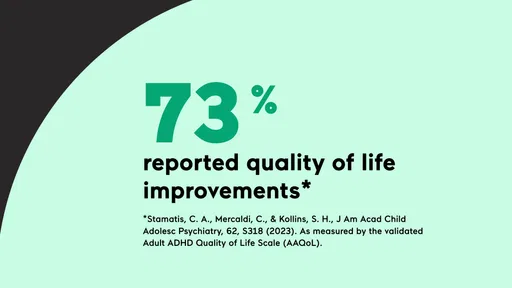
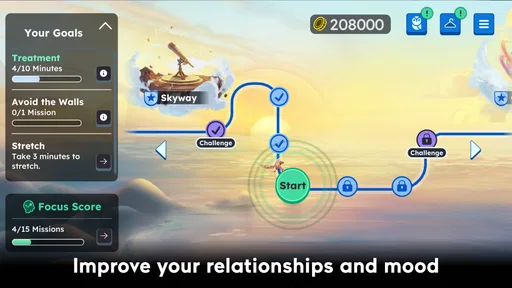
Our Review of EndeavorOTC®: Outplay ADHD
 Analysis by Appyee
I’d look at EndeavorOTC®: Outplay ADHD as a focused activity to try alongside the routines and care you already use, not as a shortcut to solving every difficult day. Its appeal is unusually specific: it turns attention practice into a mobile game experience, while its medical purpose makes it different from ordinary brain-training apps. That combination may suit people who find worksheets or abstract reminders hard to stick with, but it also means expectations matter. Enjoying a session is not the same thing as noticing a change in everyday life, and I’d keep those two outcomes separate as I decide whether it belongs in my routine.
When a connection becomes part of the experience
Because this is a connected digital therapeutic, I’d plan to begin a session when my phone has a dependable connection rather than assume the app will behave the same way everywhere. That small choice can prevent a frustrating start if I’m trying to use it between errands or in a place with unreliable service. For anyone wondering whether it works without internet, I wouldn’t build a routine around offline use unless the app itself makes that option clear. The practical approach is to try the setup at home first and see what the experience asks of you before relying on it during a commute.
That matters more than it might with a casual puzzle game. If I’ve set aside a short block of time to concentrate, a connection problem can break the rhythm before I even reach the activity. I’d avoid launching a session while moving between networks, and I wouldn’t use a game session as something I need to complete at a precise moment. Treating it as a planned pause, not an on-demand rescue button, makes the network dependency easier to live with.
Choosing a mobile moment that helps, not distracts
A phone is both the convenient part and the potential distraction. Notifications, a low battery, or the temptation to switch apps can turn a focused activity into another stop-start task. I’d silence interruptions if that suits my situation, settle somewhere I can look at the screen comfortably, and choose a time when I’m not expected to respond immediately. That is especially useful for adults fitting practice around work or household duties: a session is more likely to feel worthwhile when it has a clear beginning and end.
For example, someone might try it after lunch at home rather than opening it while waiting in a crowded line, where interruptions and poor reception compete for attention. A parent could help a teenager choose a regular quiet window, while still letting the young person own the routine instead of turning every session into a test. Those are not special app features; they are ways of making a phone-based activity less vulnerable to the usual phone-based distractions.
If setup or a session is interrupted
I’d handle a stalled screen the same way I handle any health app: pause, check the connection, and return when I can give the activity a calm restart. Repeatedly tapping through a setup while distracted is unlikely to make the process feel more supportive. If an account or session state is unclear, I’d use the app’s own help or support route rather than guess whether progress has been saved. That is a sensible habit for any tool where a person’s activity history matters to their own sense of progress.
There is also a useful distinction between an interrupted session and a failed routine. Missing one planned day because the phone or connection is inconvenient does not tell me whether the app is helpful. I’d judge it over a realistic period and note whether I can return without turning a missed session into guilt. A tool intended to support attention should fit imperfect schedules; if it becomes one more source of pressure, that is a reason to rethink how I’m using it.
Being thoughtful about data and expectations
Since the app involves personal use in a medical context, I’d take a moment during setup to read its privacy and account choices rather than clicking through automatically. I’d also consider whether I’m comfortable using a phone for this kind of activity in shared spaces, especially if someone else may see the screen. That is a simple, practical form of data-conscious use: understand the choices presented in the app and use it where the experience feels private enough.
I’d keep my expectations equally grounded. EndeavorOTC is described as an FDA-authorized digital therapeutic for ADHD that does not require a prescription, which makes it more than a generic collection of focus games. Still, I would not treat that status as a promise that every user will respond in the same way, or as a reason to stop working with a clinician. If I were weighing a change to treatment, I’d bring that decision to a qualified professional rather than infer it from a progress screen.
Who is likely to get the most from it?
I can see it fitting adults with ADHD who are curious about a structured, game-based way to practise attention and who can give it a reasonably consistent place in their week. It may also be worth exploring for someone who has tried general productivity timers and found that reminders alone do not hold their interest. The more useful question is not whether the app looks entertaining, but whether its particular activities feel manageable enough to repeat and whether that practice complements the person’s existing support.
I’d be more cautious if a user wants a complete organizer for appointments, medication, notes, and daily tasks. A digital therapeutic built around interactive activities is not interchangeable with a calendar, symptom journal, coaching relationship, or treatment plan. Someone who needs immediate clinical guidance, crisis support, or a personalized medication decision should look to appropriate professional care instead. And if screen-based games are tiring or unwelcome, an offline routine or clinician-guided alternative may be a better fit.
How it differs from familiar ADHD tools
Compared with a standard brain-training game, the medical framing is the key difference: this is meant to be used as a digital therapeutic, not simply as a way to pass time. Compared with a task manager, it is not primarily about listing chores and nudging you to complete them. That distinction helps set a fair test. I would not judge it by whether it remembers every appointment, and I would not assume that a high score in an activity automatically means a smoother workday.
A useful way to evaluate it is to choose one everyday situation before starting: perhaps staying with a reading task, or getting through a short block of desk work without switching activities. After a session, I’d notice whether I feel ready to return to that task, but I would avoid claiming the app caused a lasting change based on one good afternoon. Pairing it with an existing routine—such as sitting down before the first work block—can make it easier to remember without relying on a new notification habit.
Practical trade-offs before you commit
The app is free to download, though it offers in-app purchases ranging from $15 to $129.99 per item, so I’d check the purchase details shown in the app before committing to anything. That range makes it sensible to explore the available experience and understand what is included before treating the download as a no-cost long-term plan. The age rating is Everyone, but that does not replace a parent’s judgment about whether a medical app and its purchasing options are appropriate for a particular child.
Akili Interactive Labs, Inc. develops the app, which is in the medical category. It has a 3.4 average from 404 ratings, 251 written reviews, and more than 50,000 installs. I’d read those figures as a reason to form my own view rather than as a verdict: experiences with ADHD tools can differ, and a rating cannot tell me whether the game format suits my needs. The current version is 4.0.1, and it requires iOS 12 or later, so I’d check device compatibility before planning a routine around it.
One non-obvious tip is to decide in advance what “useful” means for you. If the goal is simply to complete sessions, it can be easy to focus on the app’s activity history instead of the real-life task you hoped to support. I’d pick one small, observable context—such as beginning a reading period—and check in with myself after a week or two. That is not a clinical measurement, but it can help separate novelty from a routine that genuinely feels worthwhile.
First Impressions
Let’s kick things off with the design. When you first open EndeavorOTC®, you’re greeted with a sleek interface that’s both colorful and calming. I’ve got to say, the developers did a great job making it user-friendly. No overwhelming menus or confusing navigation here, which is a win for anyone who struggles with focus.
Signing up is a breeze, and the app guides you through the initial setup with a friendly tutorial. It’s like having a personal coach right there with you. The focus is on making you feel supported right from the start.
Features Galore
What really sets EndeavorOTC® apart are its features. This isn’t just a run-of-the-mill tracker; it’s packed with activities designed to help improve attention and focus. The games are engaging and crafted specifically for those with ADHD. Think of it as a fun workout for your brain.
Each session is tailored to your needs, adapting as you progress. It’s pretty neat how it learns from your performance and adjusts the difficulty. No two sessions feel the same, keeping things fresh and interesting.
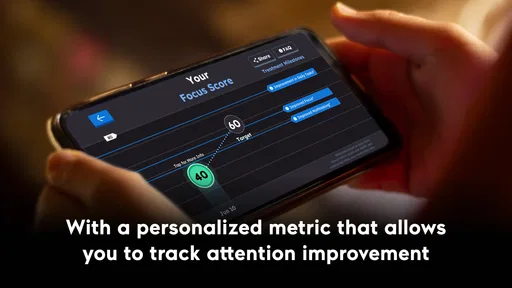
There’s also a progress tracker that gives you a visual representation of your improvement over time. It’s motivating to see those charts trending upward, giving you a tangible sense of accomplishment.
Science-Backed Approach
One of the things I appreciate most about this app is its foundation in scientific research. The developers collaborated with neuroscientists to ensure the activities are effective. It’s comforting to know that there’s actual science backing up what you’re doing.
For parents or individuals looking for a credible tool, this is a significant selling point. It’s not just about fun and games; there’s real potential for improvement here.
Community and Support
No one should feel like they’re tackling ADHD alone, and the app recognizes this. There’s a community feature where users can share tips and experiences. It’s a great space for support, and I found it refreshing to connect with others on a similar journey.
Additionally, there’s access to expert advice within the app. Whether you have questions or need guidance, the resources are plentiful. It’s like having a mini-therapist in your pocket.
Personal Experience
After using EndeavorOTC® for a couple of weeks, I did notice subtle improvements in my ability to focus. The activities are genuinely enjoyable, and they don’t feel like a chore to complete. I found myself looking forward to my daily sessions.
Of course, it’s important to remember that everyone’s experience will differ, but for me, the consistency and engagement made a positive impact.
Final Thoughts
Overall, EndeavorOTC®: Outplay ADHD is a solid tool for anyone looking to manage ADHD symptoms. It’s thoughtfully designed and backed by science, making it a credible option in the mental health app space.
While it might not replace professional treatment, it’s an excellent supplement that can enhance your overall approach to managing ADHD. If you’re on the fence, I’d say give it a shot. You might just find it’s the missing piece in your mental health toolkit.
Making the routine sustainable
The biggest practical test, in my view, is whether the app stays easy to return to after the novelty wears off. I’d choose a repeatable time and place, but leave room for a missed day without trying to compensate with a longer session. If the activities start to feel like an obligation, I’d scale back and consider whether a different support tool better matches my needs. Consistency is useful only when the routine remains workable.
I’d also keep the app’s role clear when talking with family or a clinician. A game-based session can be one part of an ADHD support plan, while conversations about symptoms, school or work accommodations, and treatment choices need their own attention. The useful outcome is not simply spending time in the app; it is finding out whether this particular way of practising fits into life without crowding out other support.
My connectivity verdict
For me, the strongest case for EndeavorOTC® is its focused, game-based approach and the fact that it is positioned as a medical tool rather than general entertainment. The trade-off is that a phone session depends on having the right moment, a suitable device, and a connection that lets the experience proceed smoothly. I’d try it in a calm setting first, keep realistic expectations, and decide from my own routine whether it earns a regular place.
If you want a structured activity for attention and are comfortable exploring an app with optional purchases, it is a reasonable one to consider. If what you need is a planner, urgent clinical help, or a treatment decision, I’d choose a different resource for that job. Used with that distinction in mind, it can be an interesting addition—not a replacement for the broader care and practical strategies that ADHD may call for.
Verdict
Strengths of EndeavorOTC®: Outplay ADHD
- User-friendly interface for easy navigation.
- Customizable reminders for medication and tasks.
- Includes educational resources on ADHD.
- Tracks progress with detailed analytics.
- Supports notifications for key activities.
Limitations of EndeavorOTC®: Outplay ADHD
- Requires internet connection for full functionality.
- Limited free features; in-app purchases needed.
- May not sync with all calendar apps.
- Initial setup can be time-consuming.
- Frequent updates may disrupt usage.
Similar Picks in This Category
View All
WebMD: Symptom Checker
WebMD, LLC4.1

Microphone Amplifier
DOSA Apps4.2

Anatomy Learning - 3D Anatomy
3D Medical OU4.5

Period Tracker and Calendar
SimpleInnovation4.9

GoodRx: Prescription Coupons
GoodRx4.8

CVS Health
CVS Pharmacy4.5
Frequently Asked Questions
What is EndeavorOTC®: Outplay ADHD designed for?
EndeavorOTC®: Outplay ADHD is designed to help users manage symptoms of ADHD through game-based therapy. The app offers interactive exercises that aim to improve attention, focus, and cognitive control. It's a non-drug digital treatment, providing an engaging way to support ADHD management without relying on medication.
How does EndeavorOTC®: Outplay ADHD work?
The app uses gamification to engage users in therapeutic exercises that target specific ADHD symptoms. By playing specially designed games, users can work on improving their attention span and cognitive skills. The app tracks progress over time, providing feedback to help users understand and enhance their cognitive abilities.
Is EndeavorOTC®: Outplay ADHD suitable for all age groups?
While EndeavorOTC®: Outplay ADHD is primarily targeted at children and adolescents, it can also benefit adults with ADHD. It's important to ensure the app's content and exercises are appropriate for the user's age group. Consultation with a healthcare provider can help determine if it's suitable for individual needs.
Does EndeavorOTC®: Outplay ADHD require a prescription?
EndeavorOTC®: Outplay ADHD is available over-the-counter and does not require a prescription. However, users are encouraged to consult with healthcare professionals to ensure it aligns with their treatment goals and to integrate it effectively into their ADHD management plan.
What are the technical requirements for using EndeavorOTC®: Outplay ADHD?
To use EndeavorOTC®: Outplay ADHD, you need a compatible Android or iOS device with sufficient storage space and an internet connection for initial download and updates. The app is optimized for recent operating systems, so ensuring your device is up-to-date will provide the best user experience.
